

How to Build Your First Mining Rig: A Beginner’s Step-by-Step Guide

Bitcoin miners made a whopping $15 billion in revenue back in 2021.
Cryptocurrency mining has grown into big business. Miners get rewards each time they create a new block on the blockchain. The current reward sits at 3.125 Bitcoin per block after the April 2024 halving. This translates to hundreds of thousands of dollars at today’s prices.
Starting crypto mining isn’t just about putting some software on your regular computer. A mining rig works like a specialized computer that solves cryptographic equations and checks blockchain transactions. The setups can be basic with standard parts or complex systems packed with dozens of components and hundreds of chips.
Here’s the upside – we’ll walk you through the process of building your first crypto mining rig. This piece covers everything you need to know. You’ll learn what mining rigs are, how to build one from scratch, and which setup works better – GPU or ASIC mining.
Bull Miners has your back if you’d rather skip the building part. They sell quality crypto mining equipment at great prices that work well for beginners.
Want to be part of the mining revolution? Let’s take a closer look!
What Is a Mining Rig and How Does It Work?

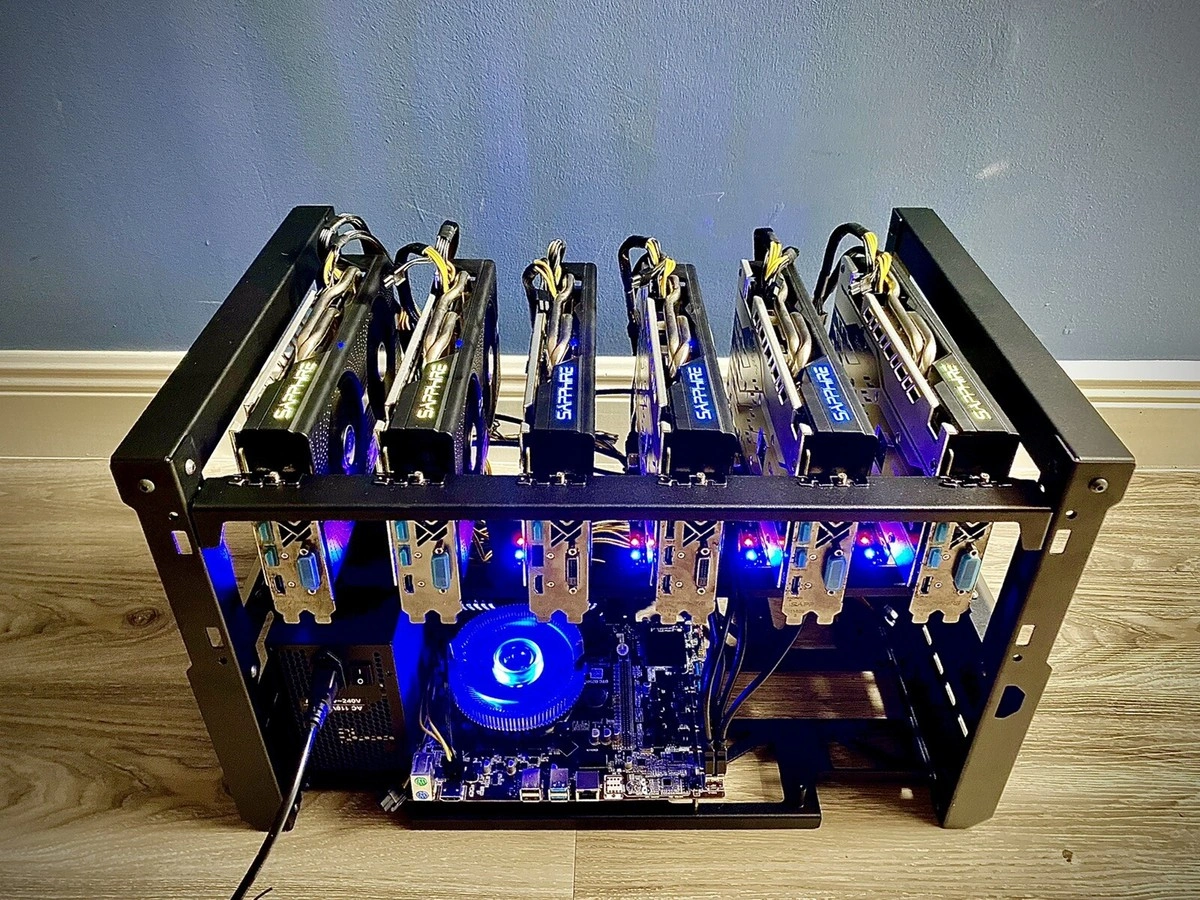
Image Source: The Geek Pub
Mining rigs are the foundations of cryptocurrency networks, especially when you have Proof of Work consensus mechanisms. These specialized machines differ from regular computers because they have just one purpose: they solve complex mathematical problems to keep blockchain networks secure and running.
Definition of a crypto mining rig
A mining rig is a specialized computer system that mines cryptocurrencies. These machines are the quickest way to handle intensive computational tasks needed to solve complex mathematical problems that confirm transactions on blockchain networks. Miners help secure the network and earn rewards through newly minted cryptocurrency and transaction fees.
A mining rig works like a specialized workhorse that never stops. It performs countless calculations each second to “win” the right to add the next block to the blockchain. Hash rate measures a mining rig’s computational power – the number of calculations it performs per second.
How mining rigs validate blockchain transactions
Mining rigs compete to solve cryptographic puzzles, and the winner confirms a new block of transactions. This process keeps everything decentralized and secure without any central authority. Bitcoin blockchain gets a new block of transactions about every 10 minutes after a mining rig solves the block’s cryptographic puzzle.
The mining rigs use a specific hashing algorithm (like SHA-256 for Bitcoin) to create a secure digital fingerprint from transaction data. The first miner finds the correct solution, sends it to the network to verify, gets the mining reward, and the cycle starts again with new transactions.
Difference between CPU, GPU, and ASIC mining rigs
Mining hardware has changed a lot over time. Three main types have altered the map:
- CPU Mining Rigs: These were the first mining hardware that used Central Processing Units from standard computers. They worked fine for basic mining in cryptocurrency’s early days but are nowhere near effective enough now for major cryptocurrencies. Bitcoin’s early days let you mine 100 coins daily with just your CPU.
- GPU Mining Rigs: Graphics Processing Units offer much more power than CPUs. GPU mining rigs connect multiple graphics cards to a motherboard with proper cooling systems and special software. These brought a 332% efficiency boost compared to CPU miners.
- ASIC Mining Rigs: Application-Specific Integrated Circuits are state-of-the-art mining technology. Unlike general-purpose CPUs or GPUs, ASICs are custom-built chips that optimize specific cryptocurrency algorithms. They work better and faster but cost more and are less versatile. A Bitcoin ASIC calculates hashes 100,000 times faster than the best CPU.
ASIC miners now dominate Bitcoin mining. Most of the network’s hashing power comes from ASIC machine mining farms. Bull Miners gives beginners high-quality mining rigs at competitive prices, which saves them the trouble of building their own setups.
Essential Components You Need to Build a Mining Rig
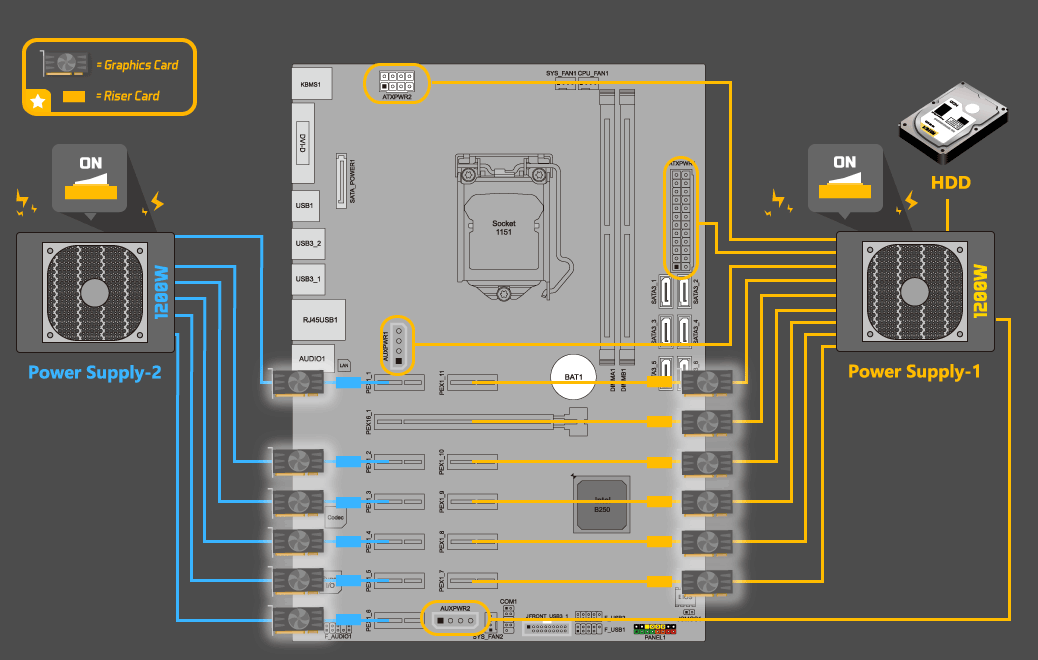
Image Source: Crypto Mining Guide
Building a mining rig needs several specialized components that work together smoothly. The right motherboard and proper cable management play a vital role in your mining success.
Motherboard and CPU
Your mining rig’s motherboard connects all components and acts as its foundation. Miners should pick motherboards designed specifically for cryptocurrency mining that support multiple GPUs. The Biostar TB360-BTC PRO 2.0 lets you connect up to 12 GPUs at once. You could also go for the budget-friendly Biostar TB360-BTC D+ or repurpose gaming motherboards for mining.
The CPU doesn’t need to be powerful since mining depends mostly on GPU or ASIC performance. An entry-level Intel Pentium G4560 or AMD Ryzen 3 1200 will do the job. The CPU just coordinates the mining operation instead of doing calculations.
Graphics cards (GPUs) or ASICs
Your mining operation’s success depends on choosing between GPUs and ASICs. GPUs give you flexibility to mine different cryptocurrencies, while ASICs work better for specific coins.
Mid-range GPUs like the Nvidia GeForce GTX 1660 Super or AMD Radeon RX 570 give you good value for money. High-end cards like the RTX 3080 mine faster but cost a lot more.
ASICs are machines built for specific mining algorithms. They calculate hashes 100,000 times faster than the best CPUs. The downside is they can only mine specific cryptocurrencies based on their algorithm.
RAM, storage, and power supply
Your mining rig will work well with 4-8GB of RAM, though 16GB gives optimal performance. A small SSD (120-240GB) provides enough space for your operating system and mining software.
The power supply unit (PSU) makes a big difference. Look for these features:
- Double the capacity you need (run at 50-60% capacity)
- 80 PLUS Gold certification or higher for efficiency
- Enough PCIe connectors for all GPUs (avoid adapters)
- Quality cooling fan with FDB or Rifle bearing
- Protection features including over-temperature protection
Cooling systems and risers
Good cooling prevents damage and keeps performance high. Mining creates a lot of heat, especially with multiple GPUs or ASICs running non-stop. Most setups use air cooling with strategic fan placement. Larger operations benefit from liquid and immersion cooling.
PCIe risers let you connect GPUs without attaching them directly to the motherboard. This setup improves airflow and heat dissipation while making positioning easier. Quality risers help maintain stable performance and prevent data transfer issues.
Mining frame and cables
A dedicated mining frame keeps all components secure and maximizes airflow. Metal frames last longer than wooden ones. The AAAwave 12GPU Mining Chassis comes with non-slip rubber feet and you can stack it for future expansion.
Quality cables ensure safe and stable power delivery. Use high-quality copper cables instead of aluminum because they conduct electricity better. Keep cables short and organized with cable ties to improve airflow.
Bull Miners sells complete mining rigs with carefully picked components at competitive prices. These are great for beginners who want to start cryptocurrency mining without sourcing individual parts.
Step-by-Step Guide to Building Your First Mining Rig

Image Source: bitform.at
Building a working mining rig from hardware parts needs patience and careful attention. Beginners can set up a reliable system that earns cryptocurrency rewards 24/7 if they follow the right steps. Here’s how you can break this down into simple tasks.
1. Choose your mining hardware
Your budget and goals will determine which mining hardware works best. Beginners with $500-$1500 can start with mid-range GPUs like the Nvidia GeForce GTX 1660 Super or AMD Radeon RX 570. A budget of $1500-$3000 opens up options like the RTX 3060 Ti or AMD Radeon RX 6700 XT. High-end setups ($3000+) typically use RTX 3080s or AMD RX 6800 XTs.
Bitcoin miners might want to look at ASIC miners like the SEALMINER A2. These machines work better but don’t give you much flexibility. Bull Miners sells quality mining rigs at good prices if you’d rather skip the assembly work.
2. Assemble the rig frame and install components
Start by putting your motherboard on a non-conductive surface. Put the CPU in place carefully, add thermal paste, and secure the cooling fan. Push the RAM into its slots until you hear it click. The motherboard needs to be firmly attached to your mining frame with screws.
GPU rigs need PCIe risers connected to motherboard slots before you attach the GPUs. This setup helps air move better between cards than mounting them straight on the motherboard.
3. Connect power and manage cables
Mount the power supply unit in your frame and plug the 24-pin ATX power cable into the motherboard. Add the 8-pin CPU power connector too. Each GPU needs its own power cable from the PSU – never chain multiple GPUs on one cable.
Good cable management helps your system run cooler. Use cable ties to keep things tidy and help air flow better. The 80% rule matters here – only use 80% of what your PSU can handle when mining continuously.
4. Install operating system and mining software
Windows makes things easy for beginners, but Linux systems like HiveOS run more efficiently. HiveOS lets you control your mining rigs from any browser or phone app.
Once you’ve got your OS ready, grab the GPU drivers from the manufacturer’s website. Pick your mining software based on what you want to mine: CGMiner or BFGMiner work for Bitcoin, PhoenixMiner suits Ethereum, and NiceHash lets you mine different coins.
5. Test and troubleshoot your setup
Run some tests before you go all in. Keep an eye on temperatures – they should stay under 70-75°C for best results. No display showing up? Check if the RAM is seated properly.
BIOS settings can cause problems too. Make sure “Above 4G decoding” is turned on if you’re using multiple GPUs. Join a mining pool that matches your cryptocurrency and set up your wallet address in the mining software to keep things running smoothly.
Setting Up Your Crypto Mining Operation

Image Source: Medium
Your mining rig’s performance and longevity depend on the right setup after assembly.
Selecting a location with proper ventilation and power
The perfect spot for your mining rig needs to balance several factors. Your intake air temperature should stay between 10-25°C. Temperatures that go above 30°C can trigger protection mechanisms and your hash rate drops to zero. Miners in warmer climates can use evaporative cooling to bring down intake air by 15-30°F. Your equipment needs protection from electrical fluctuations, so voltage regulators and surge protectors are essential. Bull Miners has high-quality mining rigs that come with cooling solutions that work in environments of all types.
Connecting to a mining pool
Mining pools give you a better chance to earn rewards consistently. Start by setting up an account on your chosen pool’s website. Each device needs its own worker name which makes monitoring easier. Your mining software needs the pool’s stratum address – it usually looks like “stratum+tcp://pool-address:port”.
Linking your crypto wallet
Your mining earnings need a secure wallet. Hardware wallets like Ledger keep your private keys offline and offer better security. The recovery phrase must stay private – don’t share it with anyone. The mining pool only needs your wallet’s receiving address to send your earnings directly.
Monitoring performance and uptime
The right monitoring software helps you track your rig’s metrics and sends alerts when problems come up. Tools like minerstat show you up-to-the-minute data about hash rates, temperatures, and earnings. A backup internet connection helps keep your operation running during outages.
Cost, Profitability, and Where to Buy Mining Rigs
Starting a crypto mining venture needs smart financial planning. Your profits depend on understanding the costs and returns that come with this investment.
Crypto mining setup cost breakdown
Bitcoin mining operations need significant initial capital. ASIC miners cost between USD 1500.00 to USD 17000.00. The SEALMINER A2 Hydro, for example, sells for about USD 6690.00. Here’s what other essential hardware will cost you:
- Power Supply Unit: USD 50.00-300.00
- Cooling Systems: USD 50.00-500.00 for simple fans
- Noise Control: USD 100.00-1000.00
- Ethernet Setup: USD 50.00-300.00
Electricity stands out as the main ongoing cost. You’ll need rates under USD 0.05/kWh to stay profitable. Monthly maintenance runs between USD 60.00-300.00.
Using mining profitability calculators
Mining calculators are a great way to get insights into your potential returns. Platforms like NiceHash and WhatToMine let you calculate estimated earnings based on your hardware specs, power costs, and current crypto prices.
Here’s the simple formula: Profit = Mining Earnings – Mining Expenses. Your profits will change based on:
- Network difficulty adjustments
- Cryptocurrency price volatility
- Electricity costs in your region
- Mining hardware efficiency
Buying vs. building a rig
Pre-built mining rigs offer convenience at USD 3000.00-10000.00. Building your own costs USD 1500.00-6000.00 but requires technical expertise.
Pre-built rigs give you:
- Quick setup without debugging hassles
- Warranty and support coverage
- Performance-optimized systems
The DIY approach offers:
- 10-30% cost savings
- Customization flexibility
- Hands-on learning opportunity
Bull Miners: High-quality mining rigs at unbeatable prices
Bull Miners delivers ready-to-use mining solutions perfect for newcomers to cryptocurrency mining. Their rigs combine quality components with efficient cooling systems at competitive prices. Bull Miners simplifies the path to mining profitability for those who want to skip the technical complexities of building their own systems.
Conclusion
You might feel overwhelmed when building your first mining rig. But don’t worry – this piece breaks down the process into simple steps that even beginners can follow. We’ve covered everything from basic crypto mining concepts to detailed hardware needs and setup steps you’ll need to succeed.
Your choice of hardware will affect both your upfront costs and future profits. GPU rigs let you mine different cryptocurrencies, while ASIC miners work better for specific coins. Good ventilation, stable power supply, and proper cooling systems are the foundations of keeping your equipment running well and lasting longer.
New miners with limited hardware should join a mining pool instead of mining alone to get steadier rewards. Mining profitability calculators help set realistic expectations about possible returns based on your setup before you invest any money.
Bull Miners sells top-quality crypto mining equipment at great prices if you’re unsure about putting parts together or fixing technical problems. Their ready-to-use solutions take away the hassle of building from scratch while delivering the performance needed to mine profitably.
The digital world of crypto mining changes faster every day. You need to stay up to date with market trends, new technology, and changing regulations. Your mining experience can start right now with what you’ve learned here – whether you build your own rig or buy one pre-made.
Think of crypto mining as both a way to earn and learn. Building and maintaining a mining rig teaches you skills that help with other technical projects and gives you deeper knowledge of blockchain technology. You now have all the tools to join the mining revolution – happy mining!
Key Takeaways
Building your first mining rig requires careful planning, proper components, and realistic expectations about costs and profitability.
• Choose hardware based on your goals: GPU rigs offer versatility for multiple cryptocurrencies, while ASIC miners provide superior efficiency for specific coins like Bitcoin.
• Budget $1,500-$6,000 for DIY builds: Essential components include specialized motherboard, GPUs/ASICs, adequate PSU, cooling systems, and proper ventilation setup.
• Join mining pools for consistent rewards: Solo mining with limited hardware rarely yields profits; pools provide steady income streams for beginners.
• Monitor electricity costs closely: Profitability requires electricity rates below $0.05/kWh; use calculators to estimate returns before investing.
• Consider pre-built rigs for simplicity: Companies like Bull Miners offer turnkey solutions that eliminate technical complexity while maintaining competitive pricing.
The crypto mining landscape evolves rapidly, so staying informed about market trends and regulatory changes remains crucial for long-term success. Whether building custom or buying pre-made, proper setup and realistic expectations form the foundation of profitable mining operations.
FAQs
Q1. What is the minimum investment needed to start crypto mining? The minimum investment for crypto mining can range from $1,500 to $6,000 for a DIY rig setup. This includes costs for components like GPUs or ASICs, motherboard, power supply, and cooling systems. Pre-built rigs from companies like Bull Miners may cost between $3,000 to $10,000 but offer convenience and optimized performance.
Q2. How do I choose between GPU and ASIC mining? GPU mining offers versatility, allowing you to mine different cryptocurrencies, while ASIC mining provides superior efficiency for specific coins. GPUs are better for beginners and those wanting to mine various coins, while ASICs are ideal for dedicated Bitcoin mining. Consider your goals, budget, and the specific cryptocurrency you want to mine when making this decision.
Q3. What are the ongoing costs associated with crypto mining? The primary ongoing cost for crypto mining is electricity. Profitable mining typically requires electricity rates below $0.05/kWh. Other recurring expenses include monthly maintenance costs (ranging from $60 to $300), potential hardware upgrades, and cooling costs. It’s crucial to factor these into your profitability calculations.
Q4. How can I maximize the profitability of my mining rig? To maximize profitability, join a mining pool for consistent rewards, ensure proper cooling and ventilation to maintain optimal performance, regularly monitor and adjust your setup using tools like minerstat, and stay informed about market trends and technology developments. Using mining profitability calculators can also help you make informed decisions about your operations.
Q5. Is it better to build a mining rig or buy a pre-built one? Building your own rig can save 10-30% in costs and offers customization options, but requires technical knowledge. Pre-built rigs from companies like Bull Miners offer convenience, optimized performance, and often come with warranties and support. Your choice depends on your technical skills, time availability, and desire for a hands-on experience versus a turnkey solution.